









Quick answer: In July 2026, a serious flaw in WordPress itself — nicknamed “wp2shell” — let hackers take over websites without needing a password. One of our clients wasn’t patched in time, and we found clear signs of a break-in: several administrator accounts in their WordPress dashboard that nobody on their team had created. This case study covers what we found, how we confirmed it was a real compromise, and the full cleanup process that got the site back to safe.
Table of contents
What happened
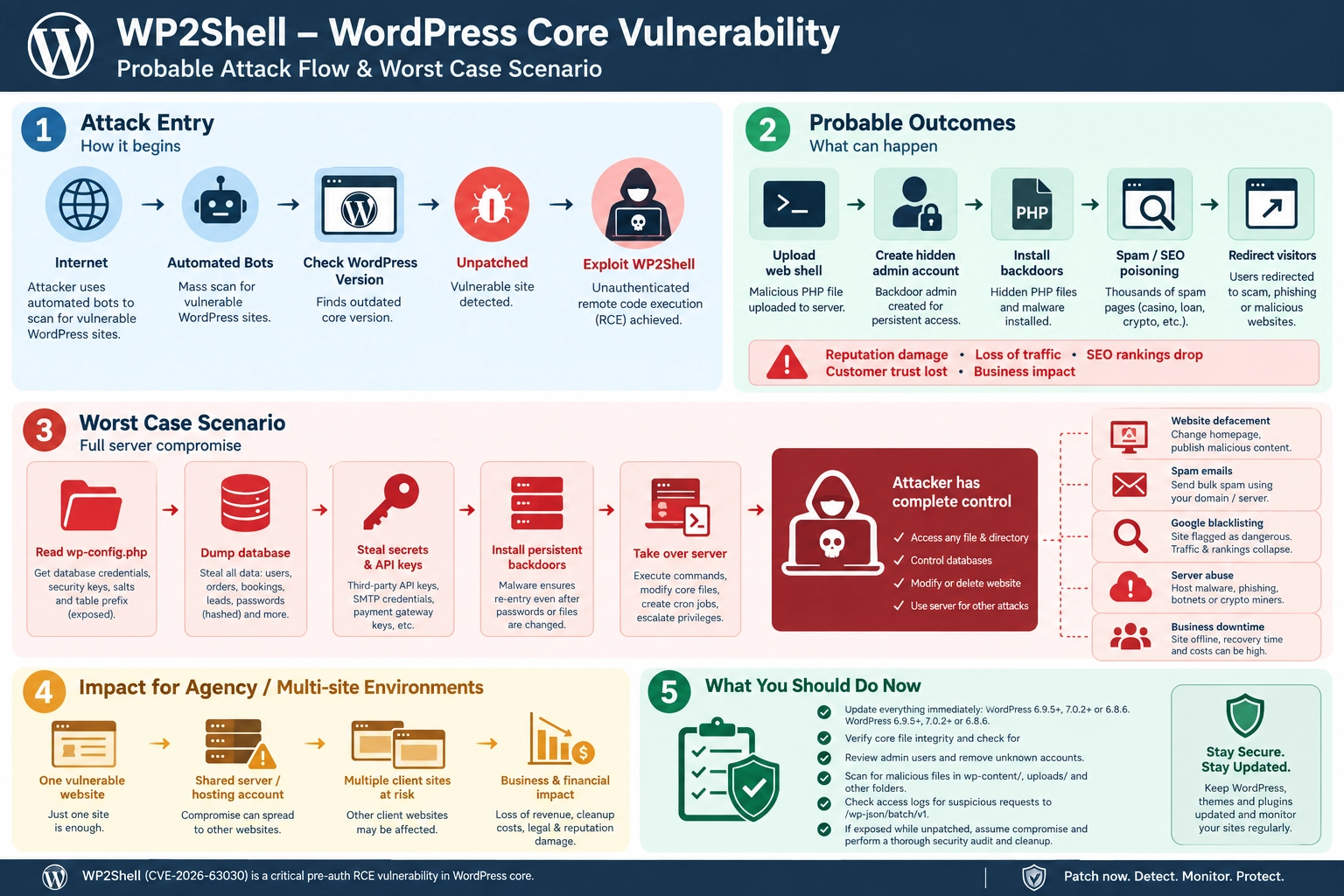
In July 2026, security researchers discovered a flaw in WordPress’s own core software — not a plugin, not a theme, the platform itself — that let an attacker take control of a site without logging in at all. Once the details became public, attackers moved fast, and sites running an unpatched version became targets within days.
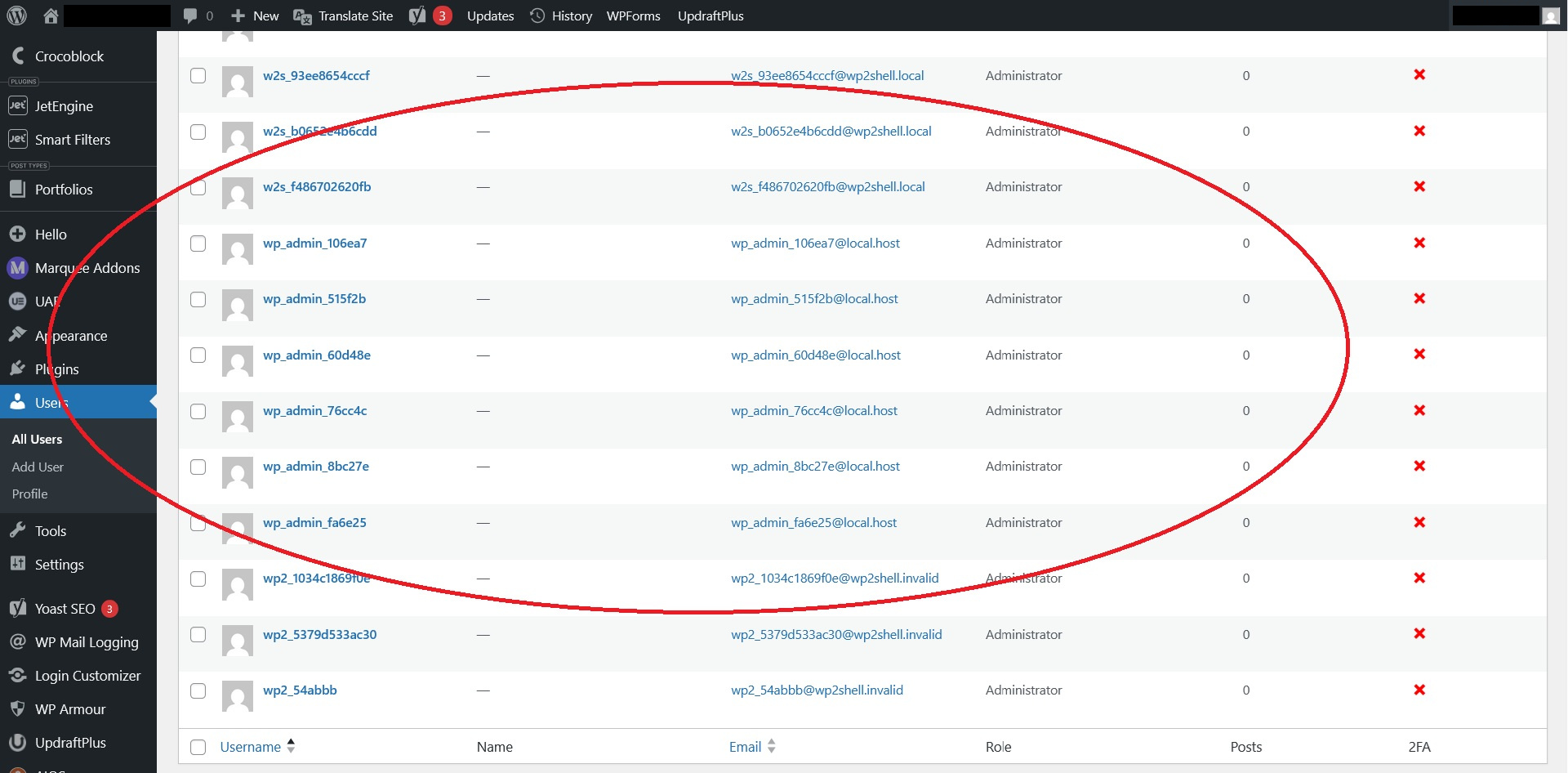
One pattern showed up repeatedly in real-world attacks: the exploit script would run, quietly create a hidden administrator account for the attacker, and in a lot of cases, the first attempt or two would fail partway through and simply leave that rogue account behind before trying again. That meant some compromised sites ended up with more than one unauthorized admin account sitting in their user list — a strong, unmistakable sign that something had gone wrong, even before anything else visibly broke.
The client
The site in this case study — referred to anonymously here as “a mid-sized professional services firm” — was running an outdated, unpatched version of WordPress when the vulnerability went public. By the time we were brought in to check it, the damage was already done.
What we found
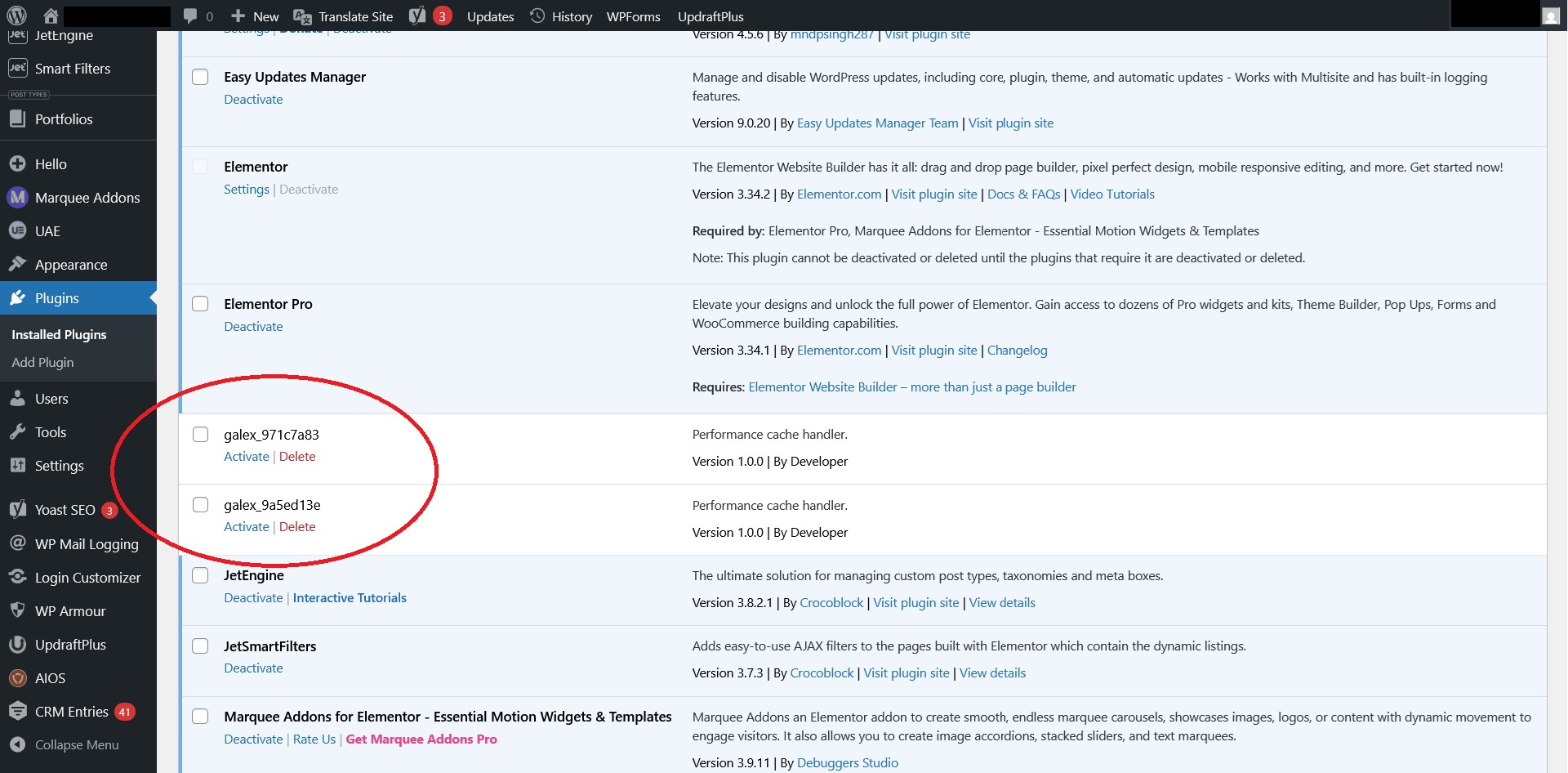
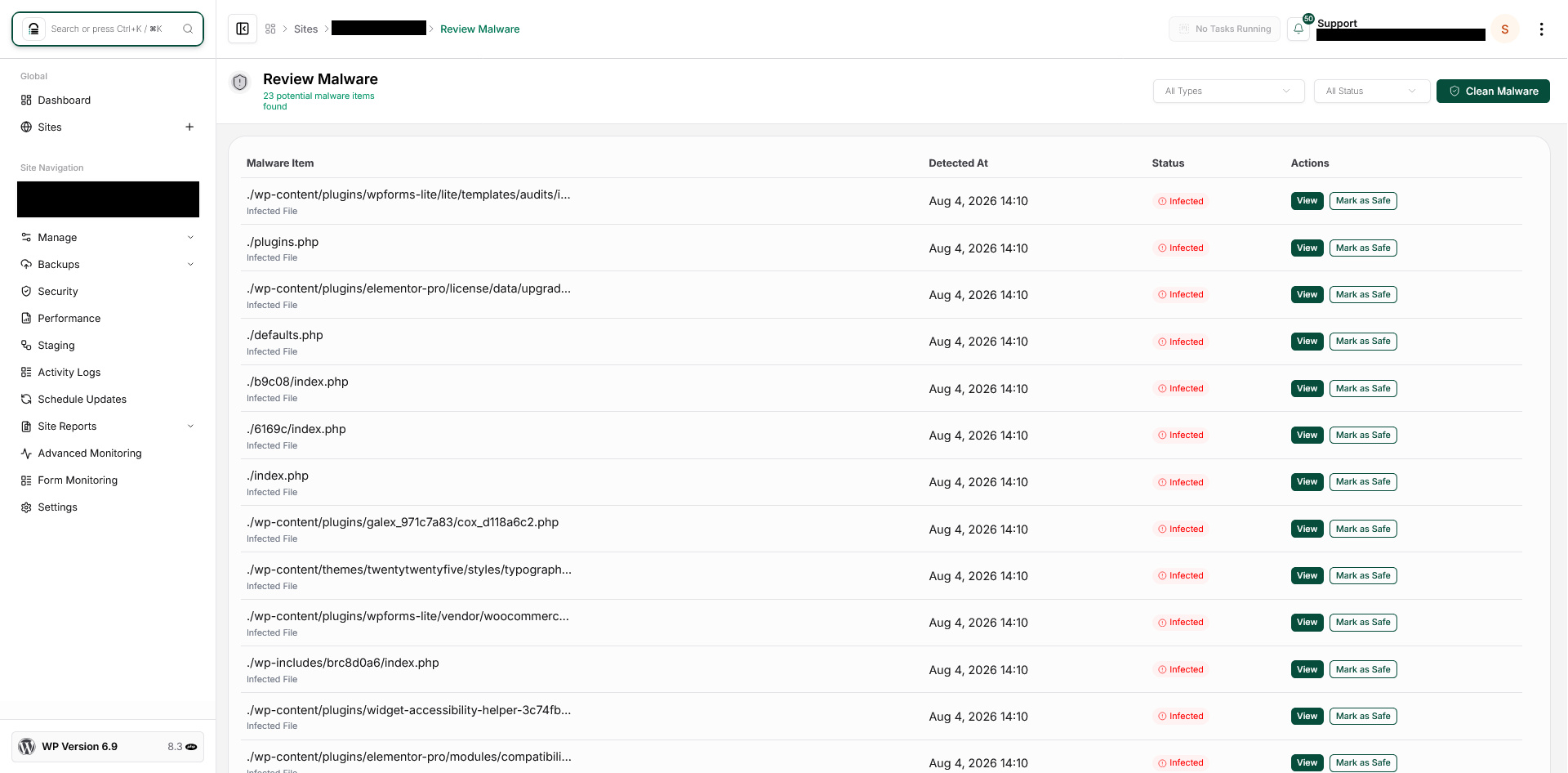
Reviewing the site’s user list turned up suspicious plugins that were installed and several administrator accounts that nobody on the client’s team recognized or had created. That alone was enough to treat the site as compromised, not just at-risk — a stray admin account is not something that happens by accident, and multiple ones pointed to more than one attempted break-in.
From there, we didn’t assume we knew the full extent of it. We treated the whole site as untrusted until we’d confirmed otherwise.
How we resolved it
- Documented everything before touching anything. Screenshots of every unfamiliar account, timestamps, and a full backup of the site exactly as we found it — compromised state included — so there was a clean record of what had happened before any cleanup began.
- Took the site offline temporarily. With confirmed unauthorized access, leaving the site live while we investigated risked letting the attacker do more damage or notice they’d been spotted.
- Set up a copy of the infected site on staging to diagnose and fix it properly. Rather than working directly on the live site, we scanned and cleaned the entire codebase in a safe, isolated environment first — so nothing got pushed back live until we were confident it was fully resolved.
- Removed every unrecognized administrator account. Each one was deleted outright rather than just demoted — a compromised account shouldn’t be trusted with reduced permissions, it should be gone.
- Reset every remaining legitimate account’s password and forced a logout of all active sessions, since any credentials active during the breach window couldn’t be fully trusted either.
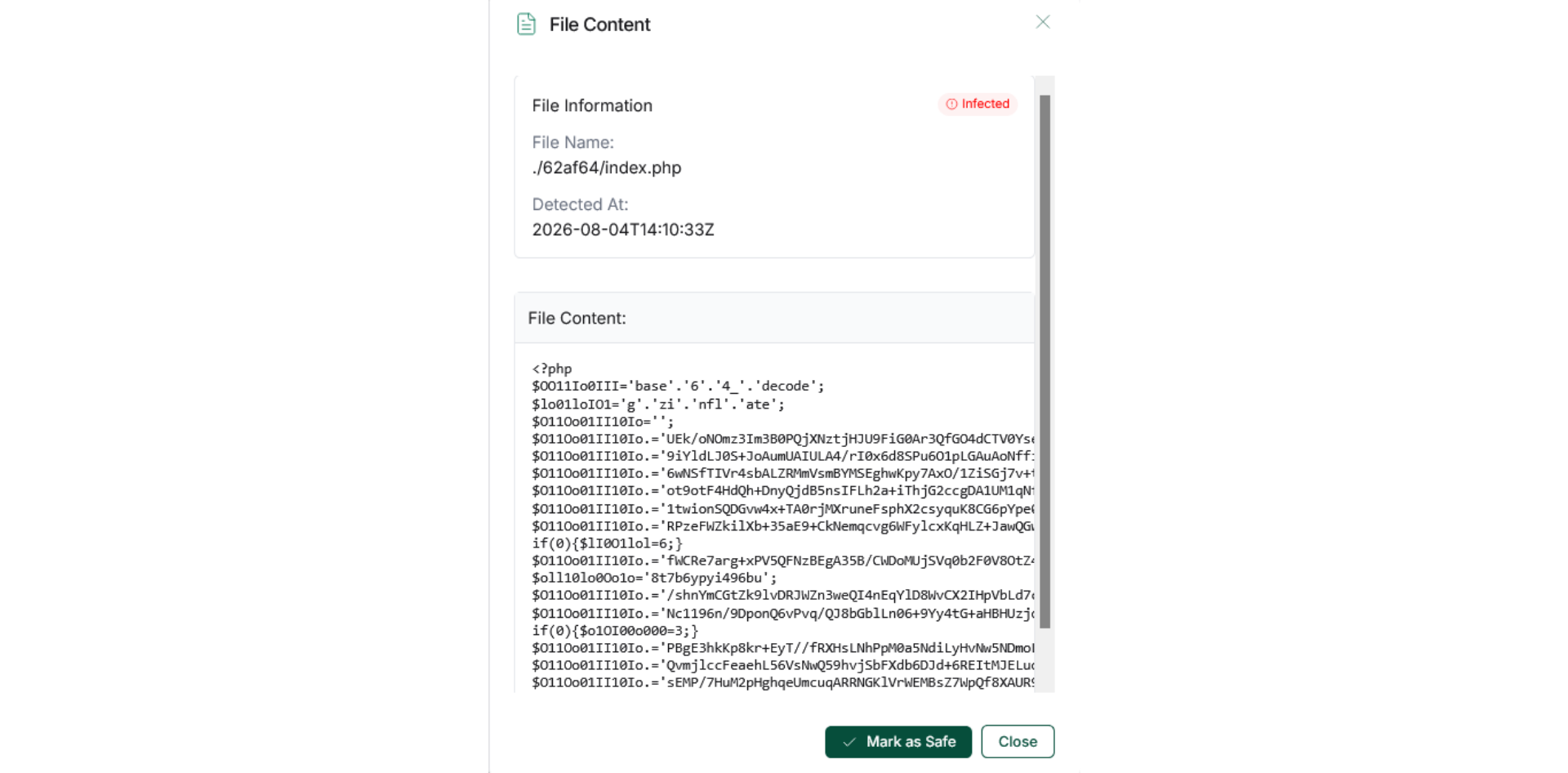
- Scanned the entire site for hidden backdoors. Rogue admin accounts are usually just the first sign — we checked for uploaded files that didn’t belong, modified core WordPress files, and any unfamiliar plugins that might have been installed to keep access even after the obvious accounts were removed.
- Checked for other footholds an attacker leaves behind — scheduled tasks, hidden files in unusual folders, and anything set up to quietly recreate an admin account even after cleanup, which is a common way attackers try to stay in after the obvious signs are cleared.
- Patched WordPress core and every plugin to their current, fixed versions, closing off the original vulnerability that let the attacker in. We also audited the full plugin list against what the site’s front end actually used in practice, and removed anything unused or unnecessary — every inactive plugin left installed is one more potential entry point that doesn’t need to exist.
- Pushed the cleaned, fully patched site live, replacing the compromised version entirely rather than layering fixes on top of it.
- Tested everything — homepage, forms, login, and any client-facing features — to confirm the site was both clean and fully functional.
- Kept monitoring closely for weeks afterward. A site that’s been broken into once is worth watching more closely for a while, since a sophisticated attacker sometimes leaves a way back in that isn’t obvious on the first pass.
What this incident illustrates
The account that gave this away was very ordinary-looking on the surface — nothing was defaced, nothing was obviously broken. If nobody had actually looked at the user list, this could have gone unnoticed for a long time. That’s the uncomfortable truth about a lot of WordPress compromises: the site keeps working, keeps looking normal, right up until the attacker decides to do something with the access they already have.
This is also why cleanup has to go further than just removing the obvious problem. Deleting a rogue admin account and calling it done, without checking for backdoors or lingering access, is one of the most common mistakes in WordPress incident response — and it’s how sites end up “cleaned” today and compromised again a few weeks later.
FAQs
Go to Users in your WordPress dashboard and look through the full list for anyone with Administrator access that you don’t recognize or didn’t personally add. Pay attention to the account creation date too — anything created around a date you don’t remember making changes is worth investigating.
Not on its own. Treat it as a sign the site may have been accessed more broadly, not an isolated problem to just tidy up. A proper cleanup checks for backdoors and hidden access points too, not just the account that happened to be visible.
Yes, if the underlying access point isn’t fully closed and monitored. That’s why patching the original vulnerability and continuing to watch the site afterward both matter — removing the obvious sign of a break-in isn’t the same as confirming the door is actually shut.
If you find an account like this, treat it as an active security incident, not routine housekeeping. A proper response — checking for backdoors, verifying core files, confirming nothing else was changed — takes experience most site owners don’t have on hand, and getting it wrong (or incomplete) is how sites end up compromised again shortly after.
Need a strong team specialised in WordPress Website Maintenance?
Speak to SBWD today to get a free website security audit to see what security gaps there are to fill.